Schedule a follow-up on a conversation
Turn “I will check with this customer later” into a scheduled follow-up with a due time. The system updates its status automatically and records whether it was completed on time.
- Who uses it
- All users
- Content updated
- 2026-11-25
Sign in to your company workspace first. Add the /app/… paths below to your company system URL.
Before you start
- Access to the shared inbox and permission to open customer conversations.
Steps
Open the Follow-up card
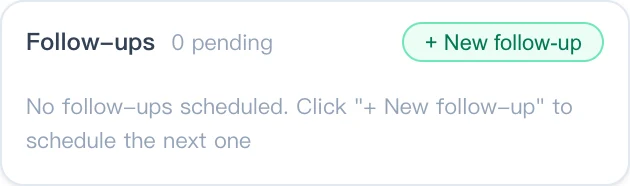
Open the customer’s conversation at /app/inbox. In the customer panel on the right, the Follow-up card sits near the top of the basic information and shows how many follow-ups are pending for this conversation.
Expected result: The Follow-up card is visible with its pending count.
Create the follow-up
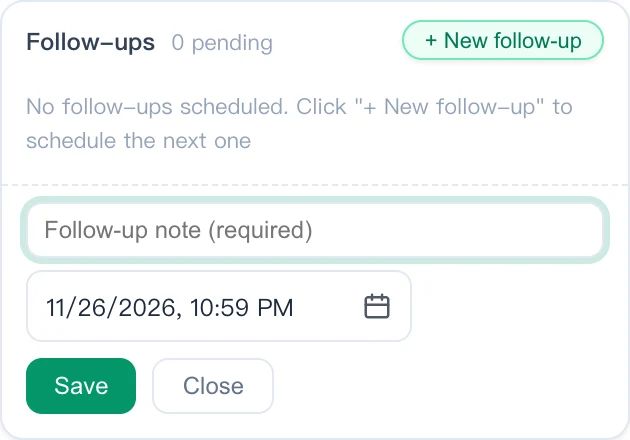
Choose “+ 新建跟进”. Enter what should be done in the required note field, and set the due date and time — it defaults to tomorrow at the same time. Choose Save. The note is shown on the card with its due time. This card is for your own next touch with this customer; when a colleague must do actual work, create a task instead (right-click the message → Convert to Task).
Expected result: The new follow-up appears on the card and the pending count increases.
Let the status update itself
Each follow-up is labelled automatically: scheduled, today, or overdue, based on its due time. No manual status maintenance is needed while it waits.
Expected result: The label on the row reflects the current state without extra work.
Close the loop on time
When the work is done, choose the check mark on the row; the system records whether it was completed on time or late, and keeps the last few completions on the card. If the follow-up is no longer needed, choose the cross mark to cancel it.
Expected result: The pending count decreases and the completion result is recorded.
Start the day from “Due today”
The workspace at /app/shell lists today’s due follow-ups across your conversations in one view. Opening it first each day keeps nothing waiting silently.
Expected result: Today’s follow-ups are visible in one list before other work begins.