Maintain the product catalog
Keep the internal product list accurate, import new items from a template, and understand the read-only business-system sync.
- Who uses it
- All users
- Content updated
- 2026-11-26
Sign in to your company workspace first. Add the /app/… paths below to your company system URL.
Before you start
- Customer-record access (the catalog uses the same permission as the customer list).
Steps
Open the product catalog
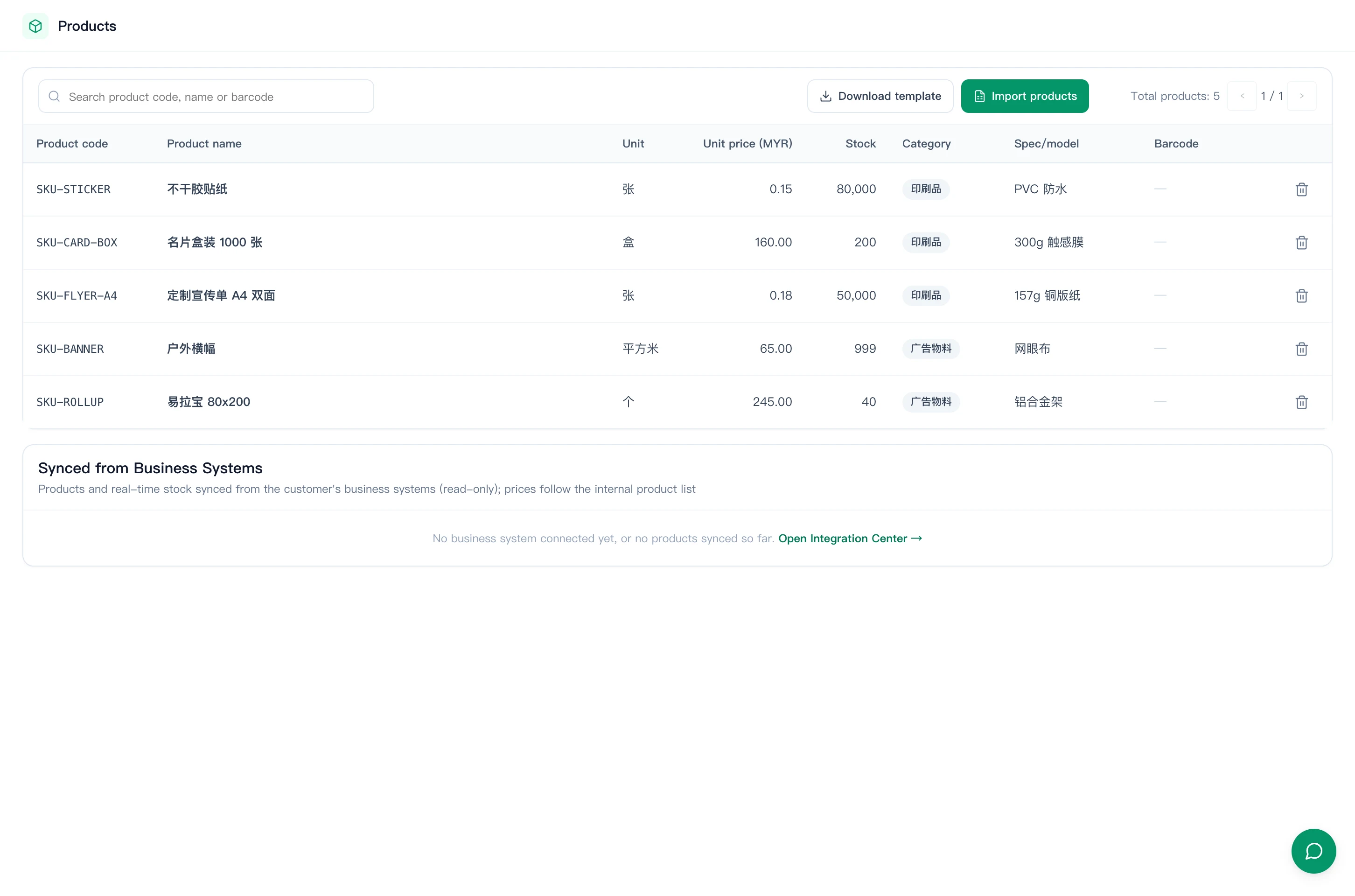
Open Contacts → Products at /app/customer/products/. The list shows SKU, name, unit, unit price (MYR), stock, category and spec for every internal product, with the total count and pagination on top.
Expected result: You are looking at the internal catalog, not a business-system mirror.
Import products with the template
Use 下载模板 to get the import format, fill the sheet, then 导入商品 uploads it. Keep the SKU stable — it is the key that updates existing rows instead of duplicating them.
Expected result: New products exist with the right units and prices.
Treat the business-system section as read-only
The 从业务系统同步 section mirrors products and real-time stock imported from a connected business system; unit prices still follow the internal catalog (单价以内部商品清单为准). When no system is connected the section shows a link to the integration center instead. Do not expect to edit mirrored rows here.
Expected result: You know which rows are internal and which are synced copies.