Transfer a conversation to another agent
Move a customer, with full history, to the colleague who should handle them next — with an optional task so the work is not missed.
- Who uses it
- All users
- Content updated
- 2026-11-25
Sign in to your company workspace first. Add the /app/… paths below to your company system URL.
Before you start
- At least one other colleague available for assignment.
Steps
Choose Transfer on the conversation
Open the conversation and choose Transfer on the toolbar above the messages. The transfer dialog opens for this conversation.
Expected result: The transfer dialog is open.
Pick the next owner and leave context
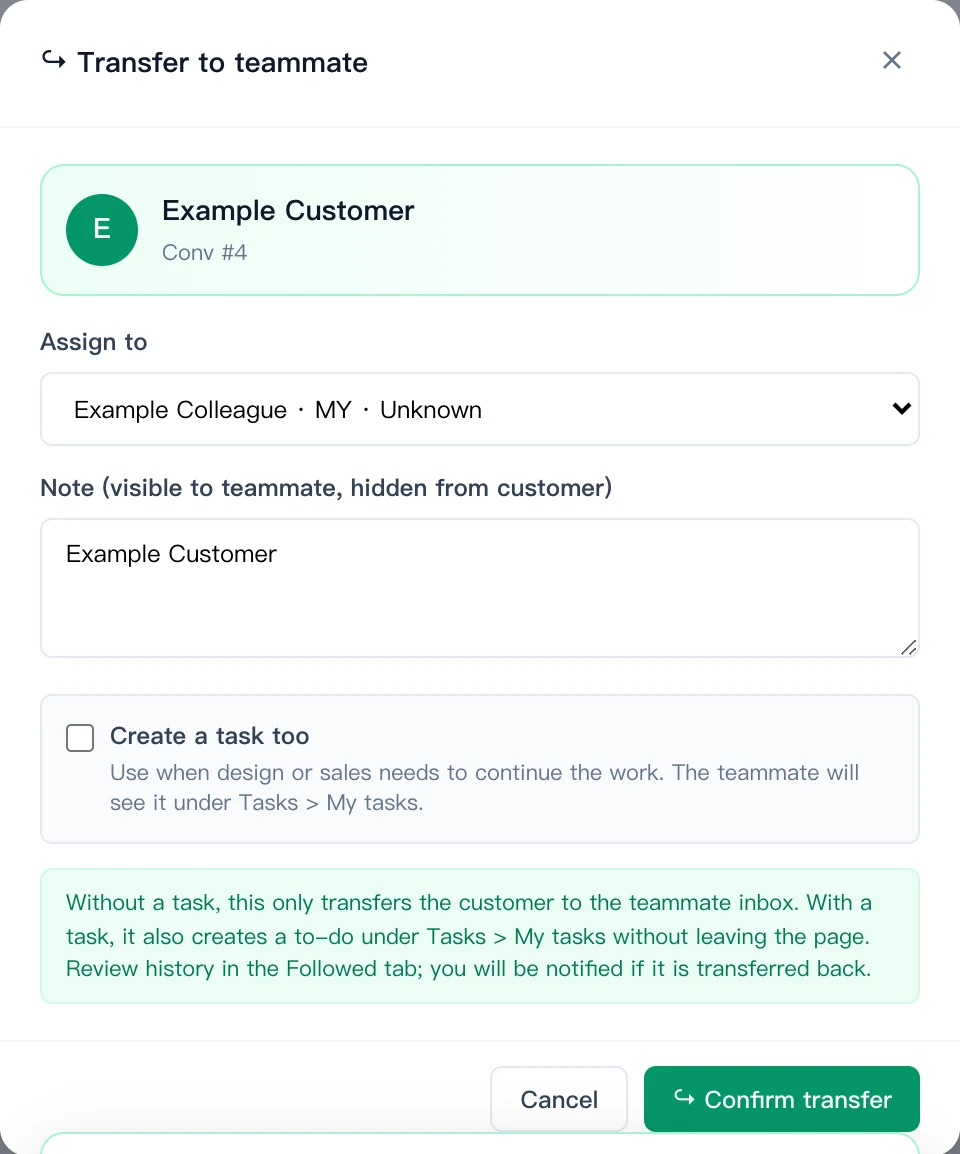
Select the colleague under “分配给”. Write a short note of what the customer wants and where things stand — the note is visible to colleagues only, never to the customer.
Expected result: The recipient is chosen and the handover context is written.
Decide whether to also create a task
Keep “同时创建任务” unchecked to simply move the conversation into the colleague’s inbox. Check it when real work — such as a design or a quotation — must follow; the colleague then also finds it under Tasks → My tasks.
Expected result: The conversation is handed over with or without a follow-up task, as intended.
Confirm and verify
Choose the confirm-transfer button. Transfers are recorded, the colleague can transfer the conversation back the same way, and a notification is sent to the new owner.
Expected result: The conversation is owned by the chosen colleague.